
Android Starter: A Claude Code Plugin for Android Projects
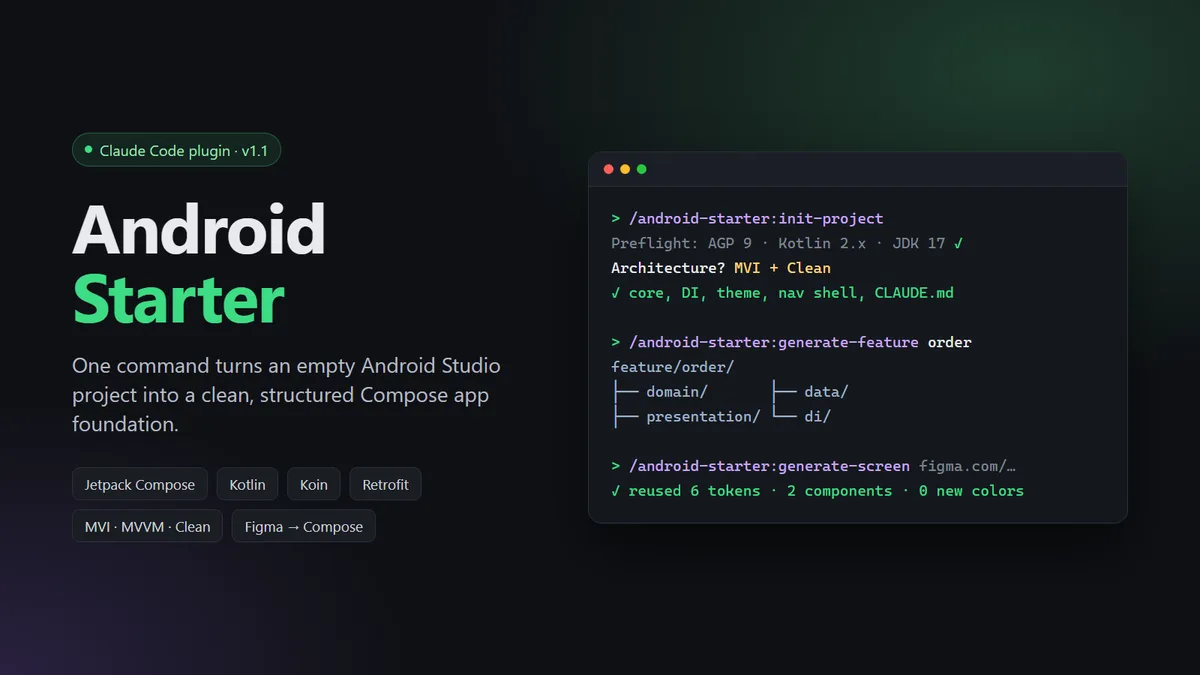
Android Starter is a Claude Code plugin that gives every new Android project the same clean, structured start. You run one command in an empty Android Studio project, and it sets up the base of the app: Jetpack Compose, Koin for dependency injection, Retrofit networking, a base ViewModel, the theme, the navigation shell and shared UI components. You pick one of four architectures: MVVM, MVVM + Clean, MVI, or MVI + Clean. Two more commands then add complete features, or build a single screen from a Figma design. Every new feature and screen follows the same rules.

Problem
Setting up a new Android project takes days of copy-and-paste work: DI, networking, theme, build environments, signing, CI. Every project ends up a little different.
AI coding tools make this faster, but they don't keep things consistent. Each session makes its own choices, so code from different sessions doesn't match, and colors, strings and components get duplicated.
Teams have no easy way to share and update one standard setup across all their projects.
Solution
/init-project checks the project first (AGP 9+, Kotlin 2.0+, JDK 17+, Compose) and lists every problem at once. Then it sets up the base for the chosen architecture, with debug, staging and release builds, ktlint, tests, CI and docs trackers.
A project CLAUDE.md stores the rules, so every later Claude session follows the same standards.
/generate-feature creates a full feature (domain, data, presentation, di) with tests.
/generate-screen turns a Figma link or a screenshot into a Compose screen. It reuses existing colors, strings and components before it adds new ones.
It ships as a versioned plugin, so a whole team can turn it on with one settings file.
My Role
Creator and sole developer. I designed the architecture templates, wrote the three commands and about 5,000 lines of templates and rules, built the preflight checks and the docs trackers, and packaged it as a versioned Claude Code plugin (v1.1.0).